MATLAB
Some Useful Commands & Types
| Command | Command | Command |
|---|---|---|
doc or help |
clear |
clc |
whos |
pwd |
home |
clock |
date |
quit |
format short |
format long |
linspace( 0,1,11 ) |
sin( pi/2 ) |
sind( 90 ) |
logspace( -3,4,8 ) |
MATLAB 和 Python 的区别
| Matlab | Python |
|---|---|
a = 4 ^ 3 |
a = 4 ** 3 |
A = [ 1 2 3 ]; |
numpy.array([[1,2,3]]) |
~= |
!= |
fprintf( 'The number is %s.' , i ); |
print('The number is %s.' %i) |
末尾输入 ; 不输出当前语句结果 |
没写print就不输出 |
true and false |
True and False |
C:\Users\Desktop\lec\lec23.m |
C:\\Users\Desktop\lec\lec23.py |
zeros(3) >>>生成3*3全零数组 |
np.zeros(3) >>>生成3*1全零数组 |
mod(a,b) |
a%b |
% 为comment;# 为脚本 |
Lec22-Intro
Numeric types
MATLAB numbers by default are all floats.
x = 5时,x的类型不是整数,而是双精度浮点数(double-precision floating point)
- 即使数值看起来像整数,它在内存中依然占用 64 位(8 字节)。
- 这是为了在科学计算中保持高精度并避免溢出
对于数字,MATLAB 实现了:
- integers
- floating-point numbers
- complex numbers
in 8-, 16-, 32-, and 64-bit versions (like NumPy).
intN(x) & uintN(x) (N=8,16,32,64)
y_int8 = int8(x); % 转换为8位有符号整数(-128到127)
y_uint8 = uint8(x); % 转换为8位无符号整数(0到255)
浮点数转换:(不管正负号)四舍五入
matlab
x = [3.7, -3.7, 2.1, -2.1];
y_int8 = int8(x);   % [4, -4, 2, -2]
y_uint8 = uint8(x);  % [4, 0, 2, 0] 负数变为零
| 函数 | 取整逻辑 | 示例 (2.6) | 示例 (-2.6) |
|---|---|---|---|
floor() |
向负无穷方向取整(地板) | 2 |
-3 |
ceil() |
向正无穷方向取整(天花板) | 3 |
-2 |
fix() |
向零方向取整(截断) | 2 |
-2 |
round()默认 |
四舍五入(最接近的整数) | 3 |
`-3 |
如果要转的数据大于类型所能承受的数据大小(如 x_int8 = int8(1000); %1000>127),则可能丢数据
whos 把workspace的所有变量的类型输出
whos a 返回a的类型
Arrays
A = [ 1 2 3 ]; %Python, numpy.array([[1,2,3]])
B = [ 1 2 3 ; 4 5 6 ]; %Python, numpy.array([[1,2,3],[4,5,6]])
C = [ 1 ; 2 ; 3 ];
D = [ 1 2 3 ]'; #行列转置 因此 C == D
[ 1 0 ; 0 1 ] * [ 2 2 ; 2 2 ] % we never show this using numpy (a.dot(b))
[ 1 0 ; 0 1 ] .* [ 2 2 ; 2 2 ] % numpy a*b
eye(M,N) #生成二维M*N数组,从(0,0)向右下角的对角线为1,其余地方为0
矩阵点乘
两个数组的每个对应维度的长度,要么相等,要么其中一个是 1
在兼容的情况下:两个数组会被自动扩展为2×3 的矩阵(取每个维度的最大长度)
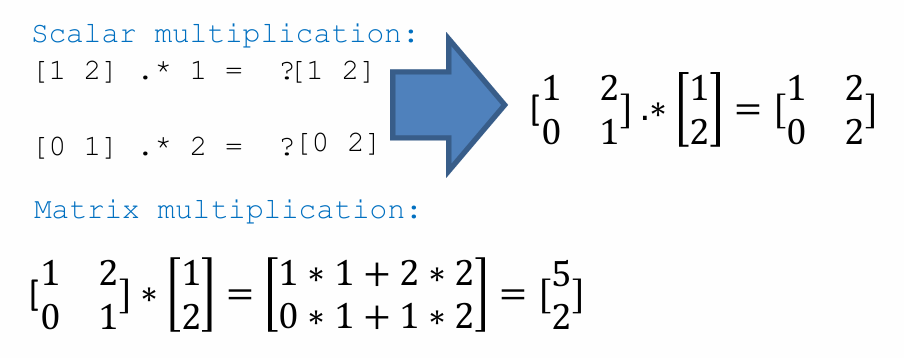
Matrix Multiplication
在MATLAB中,*运算符执行的是矩阵乘法(线性代数中的乘法),它要求:
第一个矩阵的列数 = 第二个矩阵的行数
数组的运算符
Array 的切片
索引
- 从1开始,尾端取
- 用
()取
a:b:c从a开始,每次加b,直到加到>c停(不包括大于c的)
d:e=d:1:e即默认步长为1(从d开始加1,直到加到>e停)
用 []创造矩阵,用 ()取索引
Strings
'' creates char array (字符数组)
"" creates string (字符串) 是一整个元素
s = 'I know this'
bigS = "Different? What? Confused!"   #此时bigS的length为1
s(1) >>> 'I'
bigS(1) >>> "Different? What? Confused!" %返回整个字符串
# 访问字符串内容需要使用花括号,返回字符数组
 bigS{1} >>> 'Different? What? Confused!'
 bigS{1}(1:2) >>> 'Di'
脚本(Script) & 函数(Functions)
脚本是用文件写成的程序。脚本文件和函数文件均带有后缀 .m
关于 .m 文件调用函数的问题
一个 .m 文件里可以有多个函数,但只有第一个函数(主函数)能从外部访问!
第一个函数将通过 .m 文件的名称来调用
函数句柄 类似python中的单行定义函数 lambda
Loops
for i = 1:10
    fprintf( '%d haining',i )
end

for i  = [char array]   #Note: char array is not string
 fprintf( '%d haining',i )
end
%% loop until condition is met
i = 0;
while i < 10
    i = i + 1;
    fprintf( 'The number is %i.' , i );
end
continue 和 break 与python中的功能一样
Logic
MATLAB does NOT have a bool data type.
It is called logical data type Instead of True/False, MATLAB uses integers:
0 means false; 1 means true
Recognize false and true and stores as 0 and 1
MATLAB uses 1 to indicate True, 0 to indicate False
& or && |
and |
| || or | | or |
~ |
not |
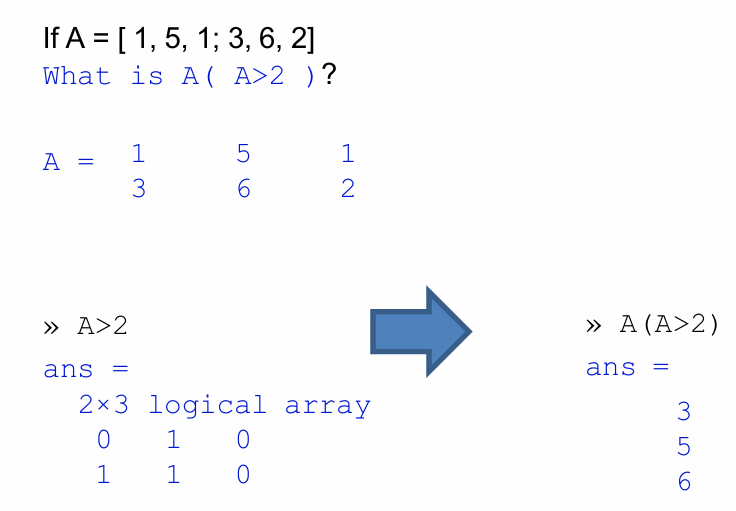
A(A>2)按照从左到右从上到下的顺序输出满足条件的元素
if a < 0
    fprintf( 'a is negative.' );
elseif a < 1
    fprintf( 'a is positive, less than unity.' );
else
    fprintf( 'a is greater than or equal to unity.' );
end
判断语句和循环语句都没有 :
Random Number Generation (ml::rand)
| Distribution | Sample Commands | Meaning |
|---|---|---|
uniform, (0,1) |
rand( 5 ) |
5×5 matrix |
rand( 5,1 ) |
5×1 column vector | |
rand( 1,5 ) |
1×5 row vector | |
10 * rand( 3 ) |
3×3 matrix from [0,10) |
|
| integer, [1,n] | randi( 5 ) |
number in range [1,5] |
| 最小值 最后 被定义 | randi( 5,2 ) |
2×2 matrix with elements from [1,5] |
randi( 5,[2 3] ) |
2×3 matrix | |
randi( [-5,5],[10,1] ) |
10×1 column vector from [−5,−5] |
|
| normal, μ=0, σ=1 | randn() |
normal random number |
randn( 5 ) |
5×5 matrix | |
randn( 5,2 ) |
5×2 matrix | |
10 * randn( 3 ) + 5 |
3×3 matrix with standard deviation 10 and mean 5 |
Lec23 - Input/Output
Save
M1: save( 'test', 'A' ); %save only A into 'test.mat'
or
M1: save( 'test'); %save everything in the Workspace into test.mat Or
M2: Use save test.txt A -ascii -append
to append the value of A into a file with the name test.txt
Load
A = load( ’test’, ’A’ ); Load variable A from text.mat
更简单的方案:双击文件,变量和值就会导入 Workspace
A = imread( ’myPicture.jpg’ ); Use imread to open images (.jpg, .png or others) 然后用 image(); 可以输出图片
dataV = importdata( ’rainfall.txt’ );
A more advanced tool (可以处理CSVs,images,etc.)
importdata('https://zjui.intl.zju.edu.cn/sites/default/files/inline-images/WechatIMG1450.jpeg' );
无需\\, 只要 \就可以
Web I/O
webread processes data gracefully.
url='https://zjui.intl.zju.edu.cn/sites/defa ult/files/inline images/WechatIMG1450.jpeg'
data = webread( url );
image( data );               %display image from an array (DEMO)
Plotting
figure(xxx) creates a new figure (window for plots).
x = 0: .1: 2*pi
y = sin( x )
figure(100) %给要创建的图形一个编号
plot( x,y,’o’ )
title( ’sin(x)’ )
xlabel( ’x values’ )
ylabel( ’y values’ )
[Other plots to use]:
A. fplot- 函数绘图器,无需预先生成数据点,matlab自动计算采样点
figure(1) %create a new figure numbered 1
x = @(t) cos( 3*t );
y = @(t) sin( 2*t );
fplot( x,y ) % plot a function defined using @(t)
hold on; %keep the graph when plotting the next
B. plot3- 绘制三维空间内曲线(曲面要用 surf 不考)
C. fcontour- 绘制3D图的等高线
figure (2)              %create a new figure numbered 2
f = @(x,y) sin( x ) + cos( y );
fcontour( f ) % plot a contour plot
D. subplot- small plots within a plot 子图布局管理器
x = linspace(0,10);
subplot(2,1,1); % 2行1列,第1个子图
y1 = sin(x);
plot(x,y1)

subplot(2,1,2); % 2行1列,第2个子图
y2 = sin(5*x);
plot(x,y2)

Lec24 - Polynomial

| Polynomial | MATLAB Representation |
|---|---|
| x+1 | [ 1 1 ] |
| x | [ 1 0 ] |
| x^2+1 | [ 1 0 1 ] |
| x^2+x+1 | [ 1 1 1 ] |
| x^4+2x^3+3x^2+4x+5 | [ 1 2 3 4 5 ] |
| 5x^4+4x^3+3x^2+2x+1 | [ 5 4 3 2 1 ] |
| x^6 | [ 1 0 0 0 0 0 0 ] |
polyval 用于多项式计算
polyval([ 1 2 3 4 5 ], [1,2,3]) %把x=1和2和3 带入多项式,得出含3个结果的行向量
myline = [ 1 1 ];
polyval( myline,1 );  %把x=1带入x^2+1这个多项式里

x = linspace( 0,10,101 );
y = polyval( myline,x );
figure
plot( x,y,'r-' );

myparabola = [ 2 1 1 ];
x = linspace( 0,10,101 );
y = polyval( myparabola,x );

figure
plot( x,y,'r-' );
多项式相乘用 conv
```matlab
u = [ 3 0 -1 ];
v = [ 2 5 ];
w = conv( u,v )
```matlab
polyint 多项式积分 不支持函数句柄
```matlab
integrand = [ 1 0 -1 0 ];
antiderivative = polyint( integrand );
integral_l = polyval( antiderivative,1 ); %带入端点值
integral_r = polyval( antiderivative,0 ); %带入端点值
integral = integral_l - integral_r; %作差求定积分
```matlab
数值积分 (离散点的积分
polyder 多项式微分 不支持函数句柄
```matlab
polynomial = [ 1 -1 1 -1 1 -1 ];
derivative = polyder( polynomial );
```matlab
零点与极值
roots([]) 在多项式中找到根(包括复根),并返回为列向量
poly() 取多项式方程的根,然后将其转换回多项式数组
poly( [ 1 -1 0.5 ] )
fzero() 寻找一个函数(不一定是多项式)的零点
f = @(x) x.^2 - 1
or
f = @(x) polyval([1,0,-1], x);  %f要以函数句柄形式封装
a.fzero()
x = fzero( f,x0 )   %一个x0只能得到一个root
Minimize
x =-1:.01:2;
y = humps( x ); % a function available in MATLAB
xstar = fminbnd( @humps,0.3,1 );              %从[0.3,1] get x-value only

OR

[ xstar, ystar ] = fminbnd( @humps,0.3,1 );   %get x- and y-values
figure;
plot( x, y, xstar, ystar, ‘ro’ );
xlabel( ’x’ );
ylabel( ’f(x)’ );
grid on;
Lec25 - Basic Statistics
Statistical quantities
rng( 101 );    % seed the random number generator, so the set of random numbers can be always the same. Mostly for troubleshooting.
x = linspace( 0,2*pi,101 )’;
y = x/50 + 0.002 * randn( 101,1 );
figure
plot( x,y,’.’ );
mean() 平均数
medium() 中位数
Std() 标准差
A = [ -5 0 10 ; -3 1 9 ; -4 2 8 ; -1 3 7 ; -2 4 6 ]
sort( A )    % 每一列从上到下升序(默认)

sort( A, 1 ) % 每一列从上到下升序(默认)

sort( A, 2 ) % 每一行从左到右升序(默认)

sortrows( A, [1] ) % 按每一行的第1个元素(默认为1)重排行

sortrows( A,3 )% 按每一行的第3个元素重排行
matlab里把新生成的都赋给 ans ,因此原变量A不变
以上A均不变!
boxplot()
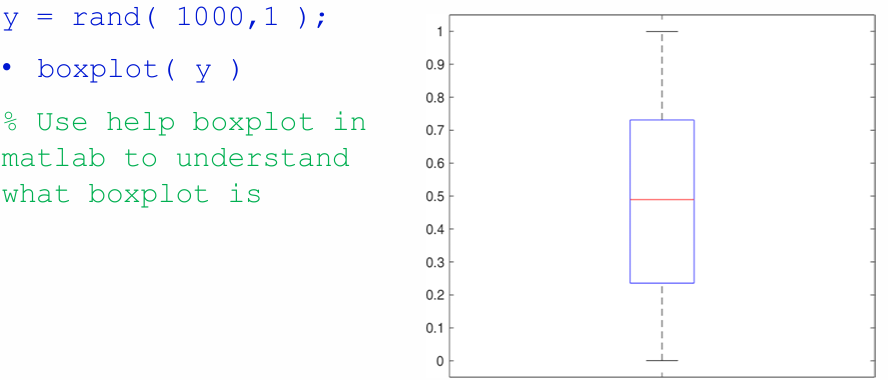
箱体的底边和顶边分别对应数据的第25百分位数(Q1) 和第75百分位数(Q3),箱子中间的标记(一条线或一个符号)代表中位数
Interpolation 插值法
interp1(x,y,x0,[type]) %默认为 linear,用线段穿过每两个数据点
注意,interp1() 是数字 1不是字母小写 l
type 有linear(default) ,nearest,pchip/cubic`这三种
x = linspace( 0,1,11 );
y = x .^ 2;
plot( x,y,’ro-’ );

% Get value of y at x_est
x_est = 0.15;
y_est = interp1( x,y,x_est );
hold on;
plot( x,y,’ro-’ );
plot( x_est,y_est,’bo’ );
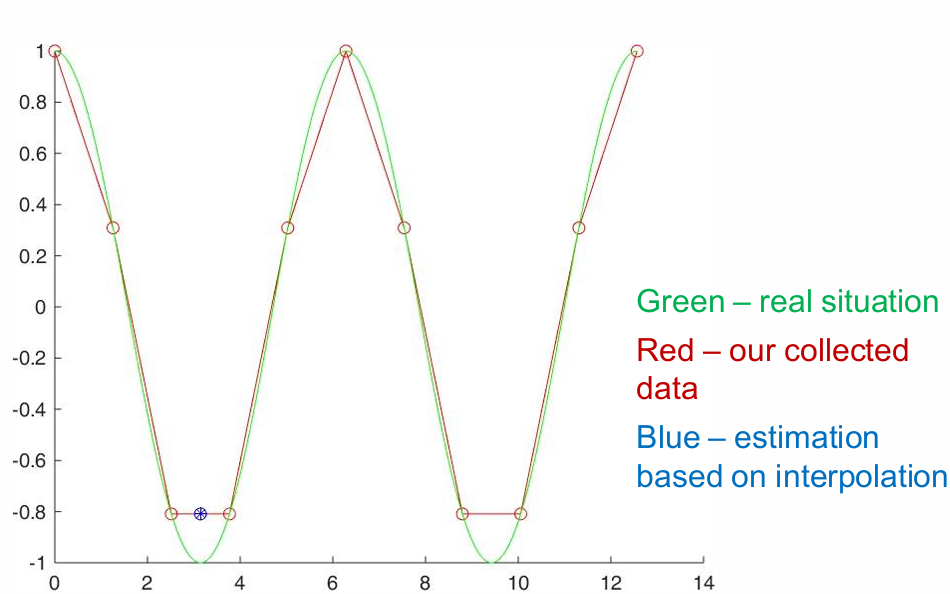
nearest 使用实际数据中最接近所需x点的x值来获得y估计值 如果是 .5,则往左取
pchip / cubic 在每两个相邻已知点之间构建一个三次多项式(除了两个数据点,还用到了这两个端点的导数(由更多点计算而来),4 个条件锁定 4 个参数,才得到唯一的三次多项式)
Matrix Equations
定义
A*x = y
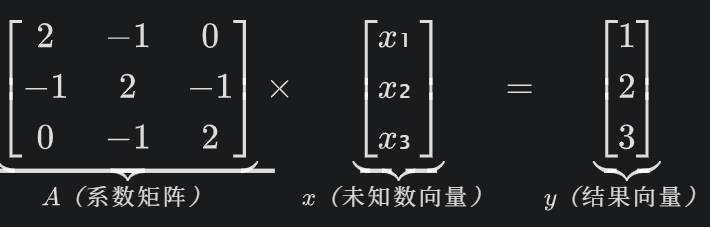
A:系数矩阵 → 把所有方程的 “系数” 按规则排成表格(比如 2 个方程的系数就排成 2 行);x:未知数向量 → 所有要解的未知数(比如 x₁、x₂、x₃)排成一列;y:结果向量 → 所有方程等号右边的数值(比如 1、2、3)排成一列。
解法
1.逆矩阵法 (x = inv(A) * y)——类比倒数求解 缺点:效率低
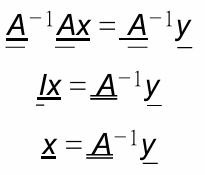
矩阵里没有 “除法”,但有类似 “倒数” 的东西叫 逆矩阵(记为 A⁻¹),满足:A * A⁻¹ = I(I 是单位矩阵,相当于矩阵里的 “1”)
所以对矩阵方程 A*x = y 两边同时乘 A⁻¹:
A = [2 -1 0; -1 2 -1; 0 -1 2];  % 3行3列,对应3个方程的系数
y = [1; 2; 3];                   % 3行1列,对应方程右边的结果

% 用逆矩阵求解
x = inv(A) * y;  % inv(A) 就是求 A 的逆矩阵
2. 左除法(x = A \ y)——MATLAB推荐,更高效
Time Code
tic; [operation]; toc
Lec26-Polyfit
Given n+1 number of ( x,y ) points (or more), we can fit a nth order polynomial as a possible curve.
polyfit(x,y,n)
p = polyfit(x,y,n) 得到从左到右an到a0的n+1个元素的行向量
%generate our x and y data
x = rand( 5,1 ); y = rand( 5,1 );

%generate our fit
xf = 0:0.01:1;
pf1 = polyfit( x,y,1 ); %linear regression (线性回归模型)

pf3 = polyfit( x,y,3 ); %cubic

%Plot our fit
yf1 = polyval( pf1,xf );
yf3 = polyval( pf3,xf );
hold on
plot( x,y,’ro’, xf,yf1,’b-’, xf,yf3,’k-’ );
% we can ask for input from user
n = input( ’Give a polynomial order’ );
x = rand( n-1,1 );
y = rand( n-1,1 );
xf = 0:0.01:1;
n1 = n              %the polynominal order you want to fit
pf = polyfit( x,y,n1 );
yf = polyval( pf,xf );
plot( x,y,’rx’, xf,yf,’r-’ );
If n > 点的数量, MATLAB 报错:
‘Polynomial is not unique’
n不能太高,否则会为了过所有点而 overfitting ,图像会失真
Estimate the Error of a Fit
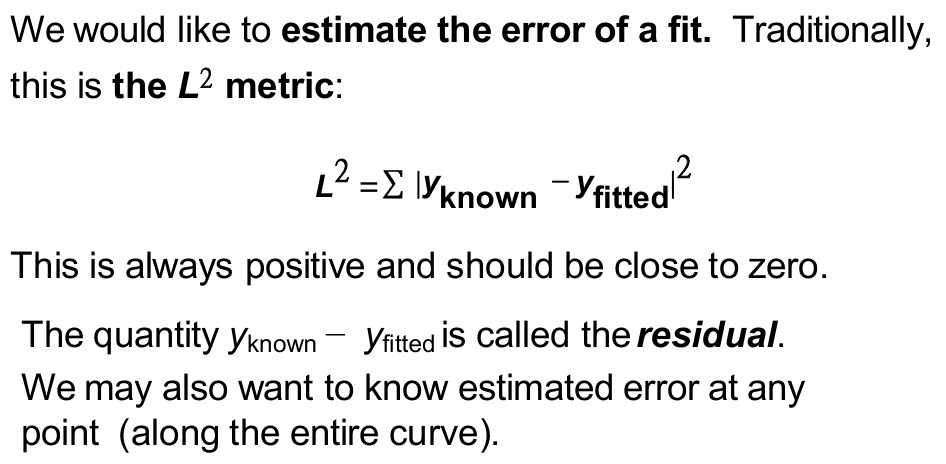
A good fit has a small residual
Another Interpolation — Spline
Splines 分段多项式,旨在平滑地拟合长段而不会过度拟合
Splines 通常由三多项式构成。 类似 interp1() 中的 pchip
一定过所有点,因为就是取点来表示函数的
y_est = spline(x,y,x_est); %x_est => x-points you want
overshoot(过冲)
underfitting(欠拟合)